




Expand Evernote’s usefulness with the Web Clipper
|
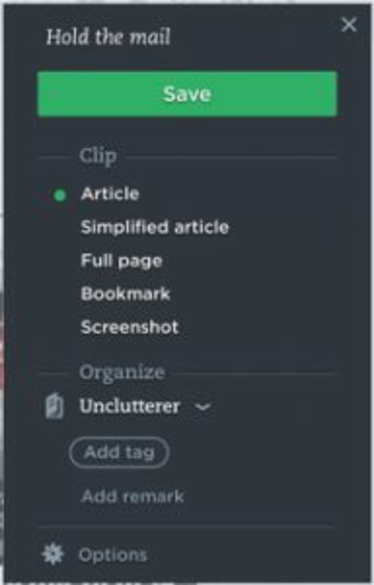
Posted By: Hija Chang on January 24, 2017 by David Caolo Here at Unclutterer, we love Evernote. I’ve often called it “my external brain,” and consider it just that. I’ve used it to create a digital journal, manage recipes, and Erin has used it to organize her busy family life. Today I’ll talk about an oft-overlooked feature: the web clipper. Evernote’s web clipper can be added on to your web browser to act as a useful go-between from the internet and Evernote. That is to say, it lets you quickly move information — links, articles, quotes, etc. — from a web browser to Evernote without requiring you to open the software. It’s fast and saves a lot of time. Today, I’ll show you the basics of using the Evernote web clipper. Installation Go to evernote.com/webclipper to download the version your browser needs. You’ll be guided through the simple process. From there you’re ready to go. To do what, exactly? Let me explain. Use I’m using Safari for Mac in this article. While there will be slight variations across browsers and operating systems, everything will be largely the same. I often use Evernote to save online articles I’d like to read later. I can save the URL, open Evernote, find the appropriate notebook, create a new note and paste in the URL, but that’s too many steps. The web clipper makes it much easier. Once installed, just click the little elephant icon that launches the web clipper (the installation process will put the icon front-and-center on your browser for you). When you do that, a new window appears (right) with five options: Article – Save the entire article as you see it. Simplified Article – Save just the text, stripping out ads and other non-essential images. Full Page – Grabs everything you see on that web page. Bookmark – Only grabs the URL. Screenshot – Takes a screenshot of the web page (or a portion thereof). Below that you’ll find the “Organize” section. From the drop-down menu, select the notebook you’d like to use as a destination. You can add tags and even “remarks” (brief notes to yourself) for future reference and context. It all takes a fraction of the time you’d spend by launching the software itself. Grab only the text you want This is a super cool feature. As soon as you click the little elephant, you may notice a little yellow square next to your cursor. This is the highlighter, and it lets you grab just a portion of the the text on a page. Simply click and drag to highlight it in yellow, then click Save on the Web Clipper. Share your clips Once you’ve grabbed a clip, you might want to share it. After clicking Save as described above, you’ll be presented with a new window that offers to share what you’ve just saved. Click the drop-down menu for several options, including email, LinkedIn, Twitter, Facebook, Google Plus, and more. This is useful if you’re coordinating information for a family trip, group work project, and so on. This was just a brief overview and I hope it prompts you to check out this often-forgotten feature. It saves me a lot of time and lets me save a lot of great info I might otherwise forget. If you enjoyed this article, Join HBCU CONNECT today for similar content and opportunities via email! |
 |
Hija Chang
Management, See Moss Interactive Bellarmine University class of 2021 Member Since January 2011 |
Comments
More From This Author
Latest Graduate School Info

 |
Graduate Student Fellowship Opportunity!We, at www.stemuscenter.org, just completed our first two informational sessions on Research Fellowship opportunity for STEM and Social Science doctoral students.
The mission of our center is to te ...more
Manisha Maurya • 2,111 Views • October 23rd, 2024 |
 |
4 Habits for Success in Online SchoolOnline education has become an increasingly popular option for students over the years, especially due to the current global pandemic. However, succeeding in online school takes more than just a good ...more
Anica Oaks • 2,413 Views • February 1st, 2024 |


Popular Graduate School Info
 |
People Judge Your Intelligence Based on the Tone of Your Voice and How Fast You Speak
Do you want people to think you are intelligent? Has someone ever told you “You’re much smarter than you look.”?
No doubt it can sting to be perceived as less intelligent, particularly when you ...more
Hija Chang • 32,594 Views • June 12th, 2017 |
 |
How to Improve Your Reading Comprehension If youd like to improve your reading comprehension, try the SQ3R method. This is an acronym that means: Survey, Question, Read, Recite and Review.
Heres how it works:
Survey Your Text
Prior t ...more
Hija Chang • 25,255 Views • June 12th, 2017 |
 |
Magna, Summa, and the Honor RollWhat does it mean to graduate with honors? Academic honors involve these Latin terms...
What is Cum Laude: Graduating With Honor means graduating cum laude. What does cum laude mean? Translators de ...more
Hija Chang • 24,865 Views • March 16th, 2016 |
 |
Never procrastinate and always free time…..One blog I read regularly is by Leo Babauta, called zen habits. Essentially, he writes all about simplifying your life. A while ago, Scott Young was a guest blogger for Babuata’s website and wrote a p ...more
Hija Chang • 14,204 Views • April 19th, 2018 |
 |
MVSU to host Graduate Expo March 1Why should you consider an advanced degree? How will you finance your graduate education? What program of study is the best fit for you?
For the answer to these questions and many more, attend Mis ...more
Hija Chang • 13,305 Views • February 27th, 2018 |


